



CFS Portal: CBPR+ features enhancements - Update
Reference
Note: This announcement, originally published on 11 November 2025, and updated on 14 November, 18 December 2025 and 16 March 2026, has been further updated to add information on processing instructions using Intermediary Agents. Changes have been highlighted.
Clearstream Fund Centre (CFCL)1 informs clients about the upcoming changes to the user interface in CFS Portal, effective business day
Monday, 24 November 2025.
CFS Portal – Cash & Liquidity – Cash
Cash instructions
The following new and renamed fields will be introduced as part of Clearstream’s ongoing alignment with Swift ISO 20022, in accordance with CBPR+ guidelines:
- Instruction details – “Instruction for Creditor Agent” (optional; only available for fund transfers to non-financial institutions and fund transfers to financial Institutions).
- Instruction details – “Instruction for Next Agent” (optional; renamed from “Details of payment”).
- “End-to-End Identification”: it is now mandatory for both “To financial institution” as well as “To non-financial institution” instructions.
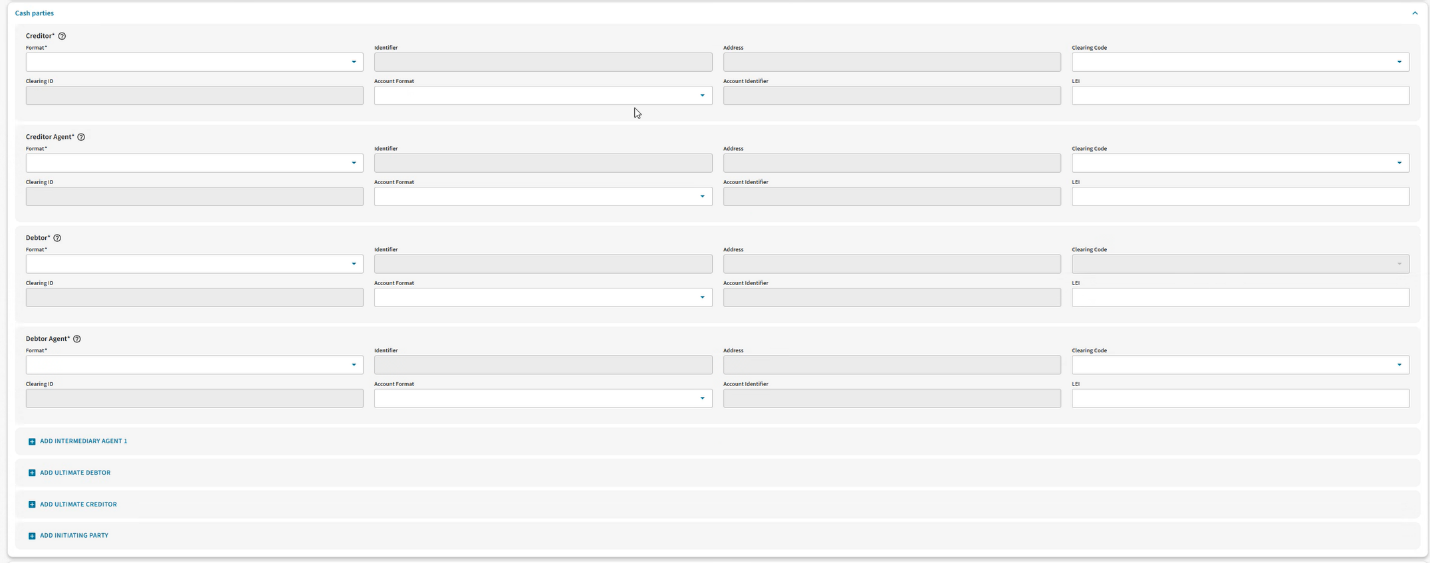
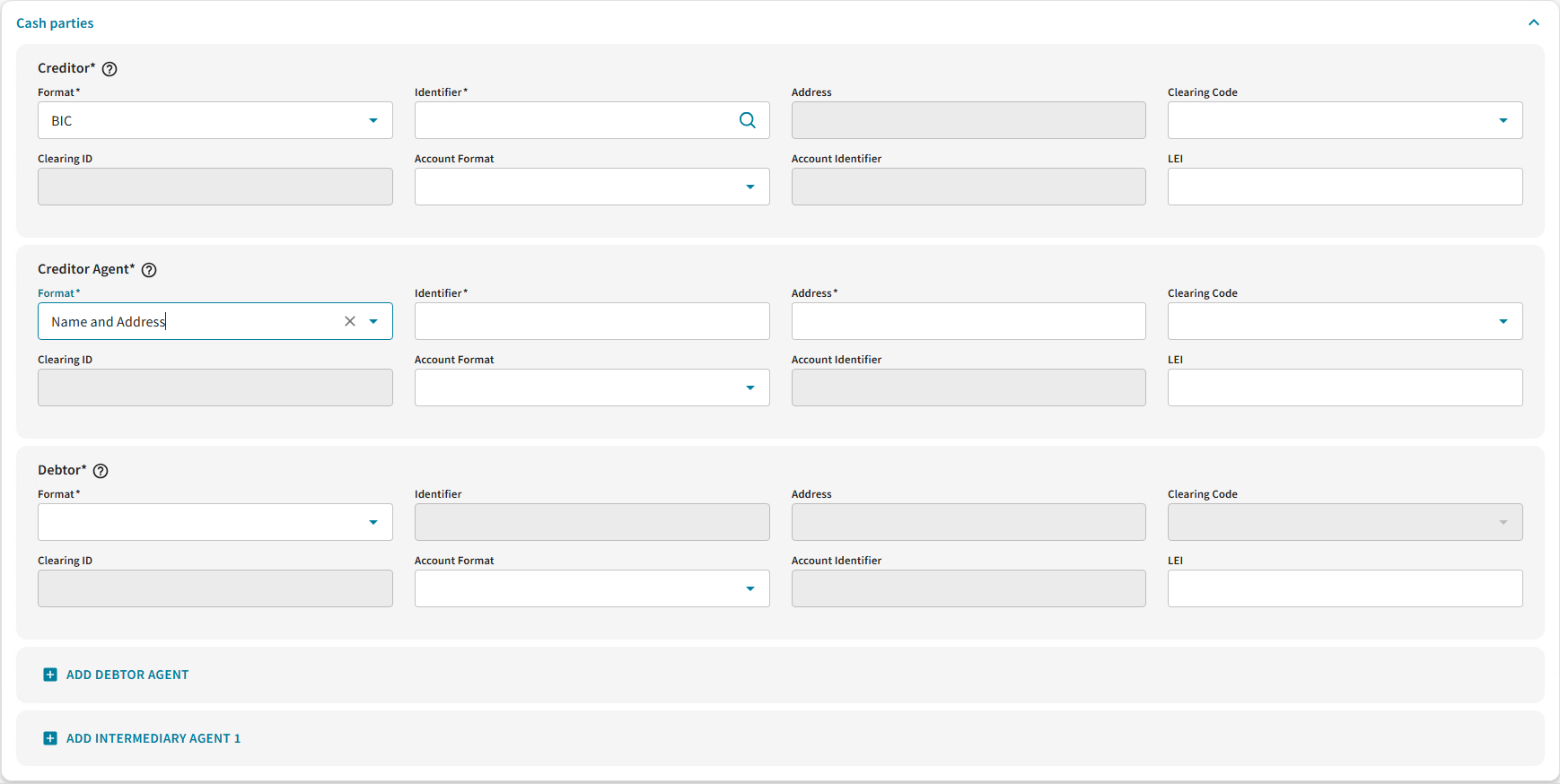
- Cash Parties: “Identifier” format “Name” is split and renamed to “Name” and “Address”.
- “Identifier” field corresponds to “Name”
- The “Address” field can be filled with “Not Provided” if the address is not available.
- New Cash Parties: The below optional fields are only available for fund transfers to non-financial Institutions. They might be required for specific market practices and currencies, and local regulations:
- “Ultimate Debtor”
- “Ultimate Creditor”
- “Initiating Party”
Only for “Ultimate Debtor”, “Ultimate Creditor” and “Initiating Party” on fund transfers to non-financial Institutions, the Address field should be populated in the format “Town Name/Country”, with the country in ISO format, two letters only (for example, “Berlin/DE”), in compliance with Swift guidelines. No further address details should be provided.
- Cash Parties: “Account”/” Clearing” field is separated into “Account Identifier and Clearing ID”
- For the “Account Identifier” field, “Account” or “IBAN” format can be chosen from the new “Account format” field.
- The “Clearing Code” and “Clearing ID” fields are disabled for Internal Transfer and Pre-advice of Funds
- The “Clearing ID” field is conditional mandatory if a “Clearing Code” is selected from the dropdown (the “Clearing Code” field remains optional). If no Clearing Code is selected, the field is disabled.
- The "Clearing Code" now uses a 5-letter format, except for "RT," which remains unchanged.
- “Clearing ID” is disabled for Clearing Code “RT”.
- The mapping of “Clearing Code” letters between ISO 15022 and ISO 20022 follows Swift guidelines, as shown in the table below:
Country | Code Name | Old Clearing Code | New Clearing Code |
Australia | Australian Bank State Branch Code (BSB) | AU | AUBSB |
Austria | Austrian Bankleitzahl | AT | ATBLZ |
Canada | Canadian Payments Association Payment Routing Number | CC | CACPA |
China | Bank Branch code used in China | CN | CNAPS |
Germany | German Bankleitzahl | BL | DEBLZ |
Greece | Hellenic Bank Identification Code | GR | GRBIC |
Hong Kong | Hong Kong Bank Code | HK | HKNCC |
India | Indian Financial System Code | IN | INFSC |
Ireland | Irish National Clearing Code | IE | IENCC |
Italy | Italian Domestic Identification Code | IT | ITNCC |
Japan | Japan Zengin Clearing Code | JP | JPZGN |
New Zealand | New Zealand National Clearing Code | NZ | NZNCC |
Poland | Polish National Clearing Code | PL | PLKNR |
Portugal | Portuguese National Clearing Code | PT | PTNCC |
Russia | Russian Central Bank Identification Code | RU | RUCBC |
South Africa | South African National Clearing Code | ZA | ZANCC |
Spain | Spanish Domestic Interbanking Code | ES | ESNCC |
Switzerland | Swiss Clearing Code (BC code) | SW | CHBCC |
Switzerland | Swiss Clearing Code (SIC Code) | SW | CHSIC |
Taiwan | Financial Institution Code | TW | TWNCC |
UK | UK Domestic Sort Code | SC | GBDSC |
US | CHIPS Participant Identifier | CP | USPID |
US | United States Routing Number | FW | USABA |
For further convenience, the Mandatory and Optional fields will be grouped together within each section. The optional fields will be displayed in ad-hoc dropdown menus.
Note: Following the CBPR+ ISO 20022 Roadmap, for “Pre-advice of funds” instruction type “UETR” and “End to End Identification” fields will remain Optional until the end of the coexistence period in November 2028. While the use of these fields is optional, Clearstream highly recommends clients to use a unique reference in the End-to-End Identification or UETR fields to ensure Straight-Through Processing (STP) of their transactions.
Cash File Upload
Please note that the Cash File Upload templates will be changed accordingly, therefore they will have to be downloaded again. The new templates will be available as of Monday, 16 March 2026 via Cash & Liquidity> Cash> Cash File Upload, by selecting "Cash instructions (CSV)" as File Content and clicking the "Download" button.
Pending Cash Instructions
The CFS Portal will allow instructions repair for any cash instructions that are released but not submitted by Friday, 21 November 2025. Repair before submission will be required for:
- Name and Address split;
- Clearing ID to be filled in if Clearing Code is filled in;
- End-to-End Identification to be filled when the instruction is a “Funds Transfer”, “To financial institution” or “To non-financial institution".
Further information
Note: Clearstream processes the instructions using only the first Intermediary Agent provided; any additional Intermediary Agents will not be taken into account, which may result in settlement delays.
These changes are already visible in the client testing environment, giving the users a glimpse of the upcoming changes.
For more information on CBPR+ please visit the CBPR+ page or contact the Clearstream Client Services or your Relationship Manager. Questions related to the technical connection can be addressed to CFS_Connectivity@clearstream.com.
---------------------------
1. CFCL refers to Clearstream Fund Centre S.A. registered office at 42, avenue John F. Kennedy, L-1855 Luxembourg, and registered with the Luxembourg Trade and Companies Register under number B-261691.